All three tools encrypt sessions and have certifications that look good in a presentation. The differences begin where the marketing ends: who controls the relay servers, how unattended access is secured, how much it costs to get a version that truly keeps your data under your control, and what the company did when it came under attack itself. We compare AnyDesk, TeamViewer and Remotly across five areas that matter to IT teams and auditors, rather than marketing departments.
Encryption: All three use AES-256, but the details differ
When it comes to session encryption itself, the three tools are similar. Each provides enough protection to prevent an attacker from obtaining anything useful by eavesdropping on network traffic.
- AnyDesk uses TLS 1.2 with RSA 2048 key exchange and AES-256-GCM session encryption. It also verifies the client’s fingerprint, making it harder to impersonate a known device.
- TeamViewer uses RSA 4096 key exchange and AES-256 session encryption. The company holds ISO/IEC 27001, SOC 2 and SOC 3 certifications. It is also an authorised CNA in the CVE Programme, which allows it to assign CVE identifiers to vulnerabilities in its own products.
- Remotly encrypts connections end to end using TLS 1.2/1.3, RSA-4096 and AES-256. Hardware‑assisted encryption means it does not affect the performance of a 4K or 6K stream.
More important than key length is the question of where encryption ends. In all three solutions, the session is encrypted between the client and the host, while the relay server only forwards encrypted packets. The difference lies in who operates that server and what connection metadata it collects. That is the focus of the next section.
Details of the competitors’ algorithms come from their public documentation. Before making a purchase, ask the vendor for an up‑to‑date technical document, as specifications can change between versions.

Who controls the relay servers
This is where the three products differ most, and it is often the deciding factor in an audit.
In its standard plans, AnyDesk routes traffic through the vendor’s global server network. The On‑Premises version, in which the entire infrastructure is hosted by the customer, is a separate product for large organisations. Pricing is quoted individually, and it requires deploying your own server.
TeamViewer follows the same model: standard plans use TeamViewer’s infrastructure. The company highlights its German headquarters and GDPR‑compliant servers. Full control over data is available only with TeamViewer Tensor, an enterprise offering with dedicated infrastructure and custom policies, at a significantly higher price than standard plans.
Remotly first attempts a direct P2P connection and uses a relay server when that is not possible. A self‑hosted Relay Server (Windows x64, Linux amd64/arm64/arm7) is included in every business plan: one server in Pro, and an unlimited number in Admin, Support and Ultra‑High Quality. There is no separate “enterprise” version: the same application, the same pricing, with traffic routed through your own server.
For small and medium‑sized businesses, this has practical implications. With the competitors, data sovereignty is a feature that requires an enterprise budget. In Remotly, it is a setting in the admin panel.
Authentication and unattended access
Most real‑world intrusions through remote desktop tools do not break the encryption. They exploit a weak unattended access password, a compromised vendor account or social engineering (“I’m calling from technical support; please give me the code”). That makes the way a tool manages identity and access more important than key length.
AnyDesk offers two‑factor authentication, device allowlists (whitelisting), an unattended access password and, in higher‑tier plans, permission management through a console. Integration with a corporate directory is available in plans for larger organisations.
TeamViewer offers an extensive set of features: account 2FA, two‑factor connection approval, trusted device lists, policy management through a console, and SSO and directory integration in business plans and Tensor. It also provides scam protection, as TeamViewer has long been the most widely used tool in technical support scams.
Remotly focuses on corporate identity: users sign in through Microsoft Entra ID / Active Directory or a Microsoft or Google account (SSO), with your organisation’s MFA policies. Permissions are managed in the admin panel, or through AD in the Admin plan. Unattended access has additional safeguards: host screen blanking, keyboard and mouse locking, camera monitoring, a risk assessment for every connection request with a notification, and a view‑only mode with clipboard access disabled. The QuickHost agent is deployed at scale through Intune using an organisation token, avoiding a situation where employees install the tool and set their own passwords.

What happened when the vendors themselves were attacked
Every major remote access vendor is a target, because compromising its infrastructure could potentially provide access to millions of computers. A company’s incident history says more about its security culture than a list of certifications.
AnyDesk, January 2024. The company confirmed a breach of its production systems. In response, it revoked code‑signing certificates, required password resets for the my.anydesk.com portal and released a new application version with a new certificate. Security researchers subsequently reported online offers to sell AnyDesk customer login credentials. The incident affected the vendor’s infrastructure rather than the sessions themselves, but for several days customers were unsure whether the installer they had downloaded could be trusted.
TeamViewer, June 2024. The company reported unauthorised access to its internal IT environment, attributed to APT29 (Midnight Blizzard), a group linked to Russian intelligence. According to TeamViewer, the breach was confined to its corporate network and did not affect the product environment or customer data. Earlier, in 2016, a wave of TeamViewer account takeovers, most likely using passwords leaked from other services, led to the introduction of mandatory account safeguards.
Remotly has no publicly reported incident in its history. However, it is fair to point out that it is a newer, smaller product and therefore a less attractive target. The architecture matters more: with a self‑hosted relay and end‑to‑end encryption, a potential breach of the vendor’s infrastructure does not give an attacker a route into your sessions, because that infrastructure does not act as an intermediary for them.
Both incidents lead to the same conclusion. No vendor is immune to compromise. The question is how much your security depends on that particular vendor avoiding a breach today.
Comparison at a glance
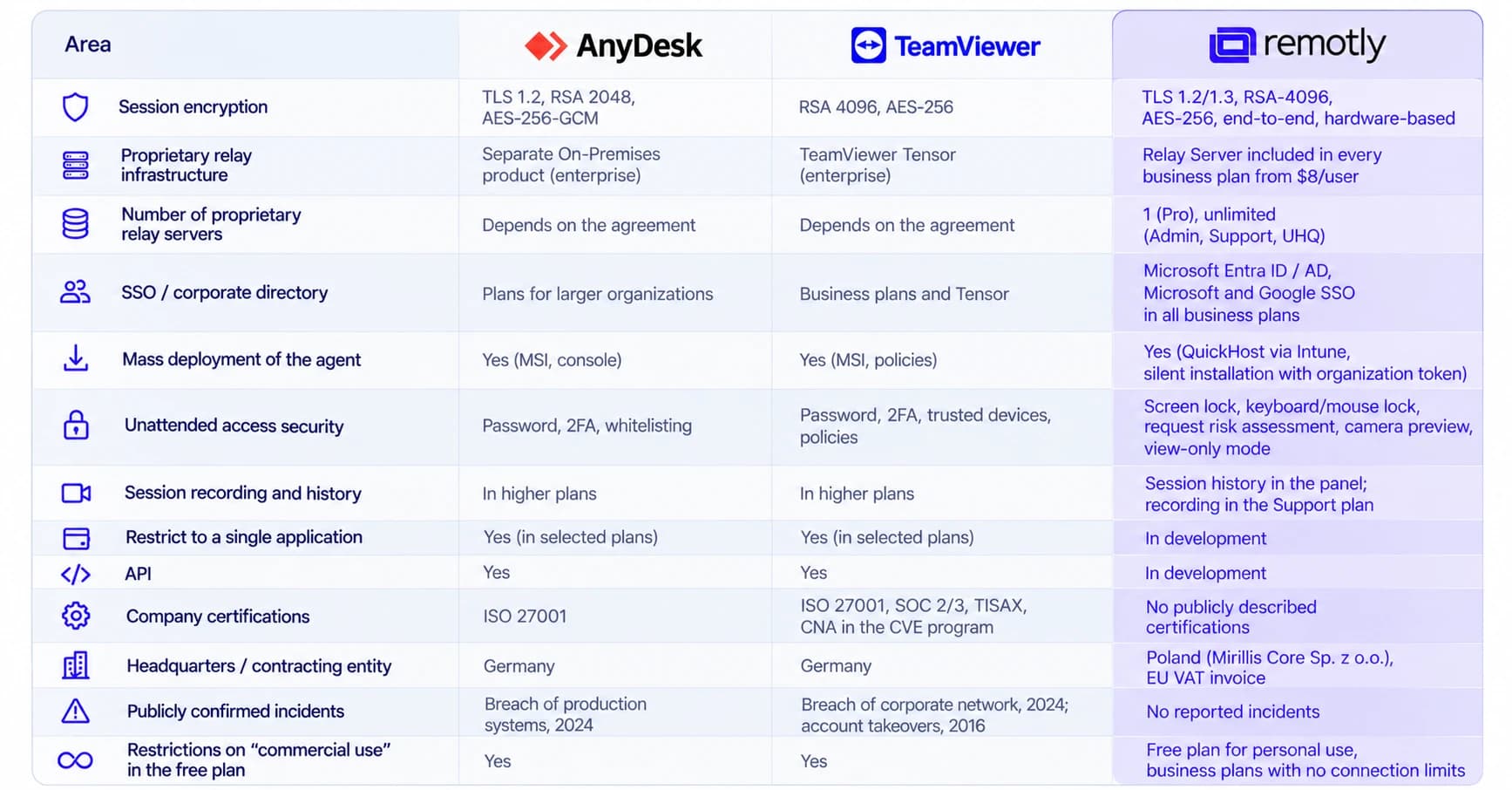
The table reflects the state of public documentation as of October 2026. Competitor features may vary between plans and regions. Before purchasing, ask for an up‑to‑date feature list for the specific plan.
Which tool suits which needs
TeamViewer is a good choice if you need the broadest ecosystem of integrations, APIs and certifications to include in a tender, and your budget allows for Tensor. You pay the most, but you get the longest checklist.
AnyDesk makes sense when a lightweight client and a simple licensing model are the priorities, and control over the infrastructure is not a requirement, or when your organisation is large enough to fund the On‑Premises version.
Choose Remotly if you want remote access traffic to stay within your own network without an enterprise budget, you use Microsoft Entra ID for identity management, and image quality (4K–6K, HDR) matters to part of your team. For businesses in Poland and the EU, there is an additional benefit: a contract and support from a European company, simplifying vendor assessment under NIS2 and the GDPR.
The simplest test: register a Remotly business account, run your own relay on any machine in your network, and compare it with what you use today. Business plans include a 30-day trial with no credit card required. If you would prefer to discuss a specific setup, write to us.
Disclosure and sources
This comparison was prepared by the Remotly team, and should be read with that in mind. We have tried to represent our competitors’ strengths fairly. Information about their products comes from public documentation and company statements, as of October 2026. If you spot an inaccuracy, write to us and we will correct it.
- TeamViewer Trust Center – certifications and security standards
- AnyDesk – public statement on the January 2024 incident
- Remotly – pricing and plan comparison
- Remotly – downloads and Relay Server
- TeamViewer statements from June 2024 regarding the incident in its corporate environment (Trust Center, Statements section)