
If your company is subject to NIS2, the route taken by every remote desktop session becomes more than a technical detail: it becomes part of an audit. Most remote access tools route traffic through the vendor’s relay servers, outside your control and often outside the EU. A self‑hosted Remotly relay server lets you keep all communication within your own infrastructure, at no additional charge and without compromising connection quality. In this article, we explain what NIS2 requires for remote access and how your own relay helps you meet those requirements.
What NIS2 is and who it applies to
NIS2 is Directive (EU) 2022/2555 on measures for a high common level of cybersecurity across the Union. It replaced the first NIS Directive of 2016 and significantly expanded the range of entities subject to its obligations. Member States were required to transpose it by 17 October 2024. In Poland, it is being implemented through an amendment to the Act on the National Cybersecurity System (KSC).
The Directive covers 18 sectors, with entities classified as essential or important. These include:
- energy, transport, banking and financial market infrastructure,
- healthcare, drinking water and wastewater,
- digital infrastructure, ICT service providers and managed security services,
- public administration,
- manufacturing (including medical devices, electronics, machinery and vehicles), the chemical industry and the food industry,
- postal services, waste management and research.
The size threshold is generally at least 50 employees or EUR 10 million in annual turnover, but in some sectors the obligations apply regardless of company size. This also matters to IT providers: even a company outside the list may be subject to requirements indirectly as a supplier to an essential entity, because NIS2 explicitly requires supply chain security management.
The penalties are substantial. For essential entities, administrative fines can reach EUR 10 million or 2% of global annual turnover; for important entities, EUR 7 million or 1.4%. The Directive also provides for personal liability of management body members for overseeing the implementation of security measures.
From an IT team’s perspective, Articles 21 and 23 are the most relevant. Article 21 sets out minimum risk management measures, including:
- policies on information system security and risk analysis,
- incident handling,
- business continuity and crisis management,
- supply chain security, including relationships with service providers,
- access control and asset management,
- the use of cryptography and encryption,
- multi‑factor authentication and secure communications.
Article 23 requires significant incidents to be reported: an early warning within 24 hours, a full notification within 72 hours and a final report within one month. To do this, you need to know who connected to your systems, when and from where. Remote desktop is one of the most common routes into infrastructure.
Where typical remote desktop setups fall short of NIS2 requirements
The traditional operating model for remote access tools works like this: the client and host register with the vendor’s cloud, and when a direct connection is not possible because of NAT, a firewall or the corporate network, all session traffic passes through the vendor’s relay servers. This is convenient, but from an NIS2 auditor’s perspective it raises four questions that can be difficult to answer.
Where is session data physically located? Global vendors operate relay servers in many regions around the world. Even if traffic is encrypted, connection metadata — who connected, when, from which address and to which machine — is sent to third‑party infrastructure, often outside the European Economic Area. For public sector, healthcare and financial entities, this can be a problem as early as the risk assessment stage.
Who is the supplier in the supply chain? Article 21 requires an assessment of suppliers’ security and practices. If access to production servers depends on a company’s cloud, and all you know about its SLA and security policy comes from a document on its website, an auditor will ask how that risk was assessed and mitigated.
Can you independently reconstruct an incident? Reporting within 24 hours requires connection logs that are readily available, rather than a request to the vendor for a data export. If session history exists only in someone else’s dashboard, response times increase.
What happens if the vendor’s cloud goes down? Business continuity is an obligation. An outage or a blocked account with your remote desktop provider means losing access to your own infrastructure precisely when you need it most.
There is also an issue familiar to every administrator: popular tools may limit bandwidth or session duration in lower‑priced plans and block connections classified as commercial use. NIS2 compliance should not depend on whether a vendor considers your connection legitimate.
How a self‑hosted Remotly relay server works
Remotly always attempts a direct peer‑to‑peer (P2P) connection between the client and host first. When that is not possible, traffic needs a relay server. The difference lies in who controls it: instead of the public Connect Anywhere cloud, you can run your own Relay Server on your infrastructure and route all sessions in your organisation through it.
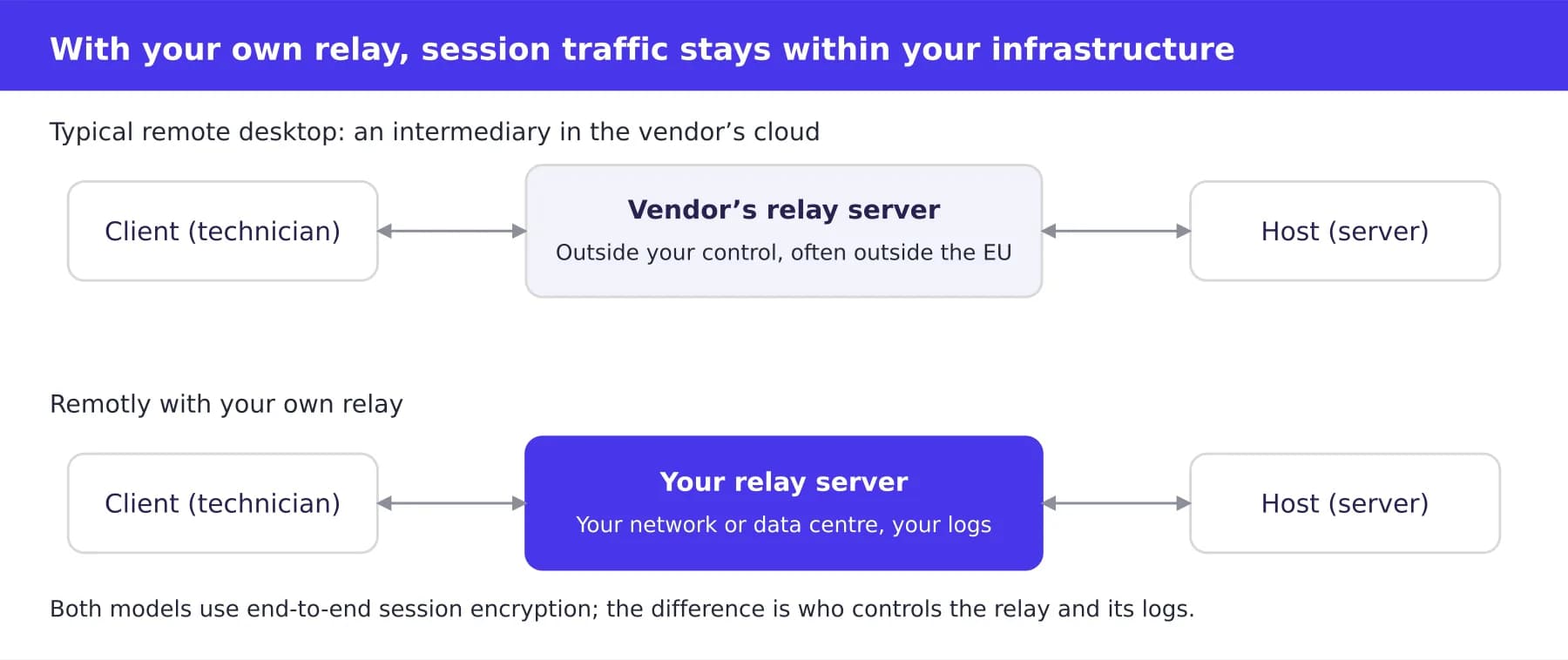
Session routing: The vendor’s relay versus your own relay
The top row shows a model that an auditor must document as a third‑party dependency. The bottom row shows the same traffic routed through a server hosted on your premises.
Key features of this approach:
- Full data sovereignty. Session traffic stays within your network or private data centre. You decide which country hosts the server and who has physical access to it.
- End‑to‑end encryption, regardless of the relay. Sessions are encrypted between the client and host using TLS 1.2/1.3, RSA-4096 and AES-256. The relay server forwards encrypted packets but cannot access their contents. Even your own relay does not become an eavesdropping point.
- Lightweight deployment. Relay Server is available for Windows x64 and Linux amd64, arm64 and arm7, so it can run on an existing server, a virtual machine or even a Raspberry Pi in the server room.
- Wake‑on‑LAN from outside the corporate network. Your own relay lets you remotely wake computers on the corporate network from outside it, so workstations can sleep after hours without losing remote accessibility.
- No limits on quality. In the Ultra‑High Quality plan, streaming bandwidth through your own relay is unlimited. This matters to teams working with video, 3D graphics and CAD.
In the Pro plan, an organisation can run one relay server. In Admin, Support and Ultra‑High Quality, the number of servers is unlimited. This means you can deploy a separate relay for each location or security zone — for example, one for the office network and another for the OT segment at a manufacturing plant.
NIS2 obligations and your own relay: The practical benefits
A self‑hosted relay server does not deliver NIS2 compliance on its own: compliance involves policies, processes and people. But it removes several questions that are particularly difficult to address in an audit when a cloud intermediary is involved.
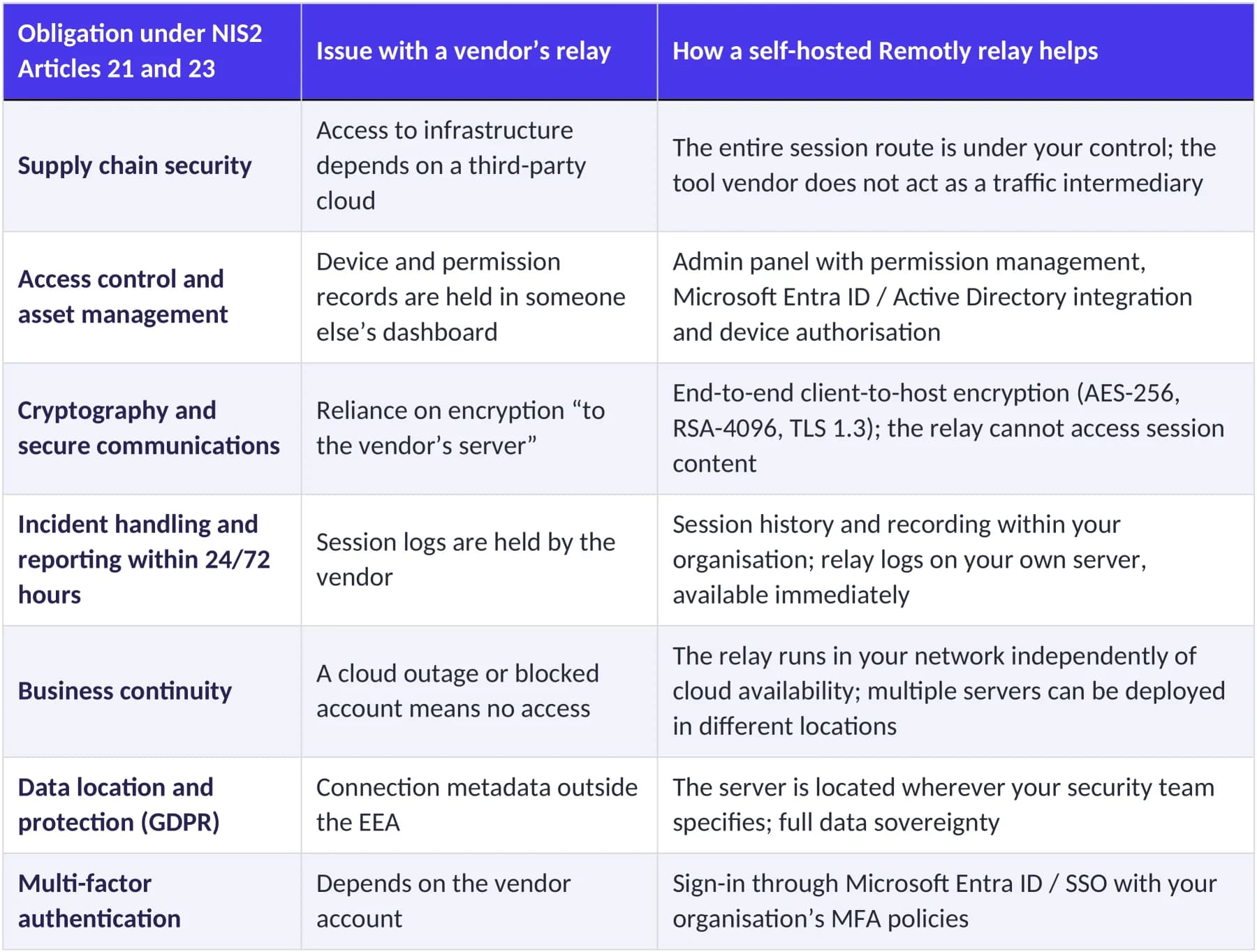
For an auditor, what matters is the ability to provide evidence. With your own relay, the answer to “Where does remote access traffic go, and who controls it?” is simple: through our server, in our data centre, with our logs.
Deployment in an afternoon
Setting up your own relay does not require a deployment project. The typical process is:
- Register a Remotly business account. Every business plan includes a 30-day trial with no credit card required.
- Download Relay Server for Windows or Linux and run it on a server in your corporate network or private cloud. Configuration instructions are available in the Download section.
- Assign your own relay to your organisation in the admin panel and, if you use Microsoft 365, connect sign‑in to Entra ID.
- Deploy the QuickHost agent to workstations and servers — manually, through a silent installation or at scale through Microsoft Intune.
- Enable session history and recording wherever your security policy requires them.
Licensing starts with the Pro plan at USD 8 per user per month with one relay, and increases to the Admin plan at USD 38 per user, with unlimited relays, full administrative permissions and AD integration. The relay server itself is included in the plan at no extra charge. A full plan comparison is available on the pricing page. Prices exclude tax and may change, so always check the website for current rates.
Remotly is developed by Mirillis Core Sp. z o.o., a Polish company known for Action!. Your contract, VAT invoice and technical support come from an EU‑based company, making supplier assessment within the supply chain simpler.
An IT checklist before a remote access audit
Before an auditor asks, check for yourself:
- ☐ You know which servers your remote desktop traffic passes through and which country they are located in.
- ☐ You have a documented risk assessment of your remote access tool provider.
- ☐ Remote access is linked to corporate identities (Entra ID / AD), rather than employees’ personal accounts.
- ☐ You can generate a list of remote sessions to a specific server over the past 30 days within an hour.
- ☐ You have a plan for accessing your infrastructure if the vendor’s cloud goes down.
- ☐ Unattended access is protected through screen blanking, keyboard and mouse locking, and device authorisation.
- ☐ Access for former employees and contractors is revoked centrally through the admin panel, rather than by “uninstalling the application”.
If any of these points gave you pause, this is a good time to test your own relay. Register a business account and start a 30-day trial, or write to us. We will help you choose a plan and configuration that suit your network structure.
Disclaimer and sources
This article is for information purposes only and does not constitute legal advice. Your organisation’s obligations depend on its sector, size and the national legislation implementing the Directive. Consult a lawyer or auditor about the scope that applies to you. Legislation and pricing as of October 2026.
- Directive (EU) 2022/2555 of the European Parliament and of the Council (NIS2) — EUR‑Lex
- Remotly — pricing and plan comparison
- Remotly — downloads, Relay Server and system requirements